How to Build a B2B Content Funnel That Generates Qualified Leads
Your sales team spends its time chasing people who won't buy.
You've published content. You're getting traffic. But most of it is noise—students researching, competitors checking you out, people in industries where you don't even operate.
A content funnel filters this. It automatically separates the real prospects from the window shoppers. Your sales team talks to people actually ready to buy. Here's how to build one.
What Is a Content Funnel?
A B2B content funnel is a structured system that guides prospects through the buying journey using targeted content.
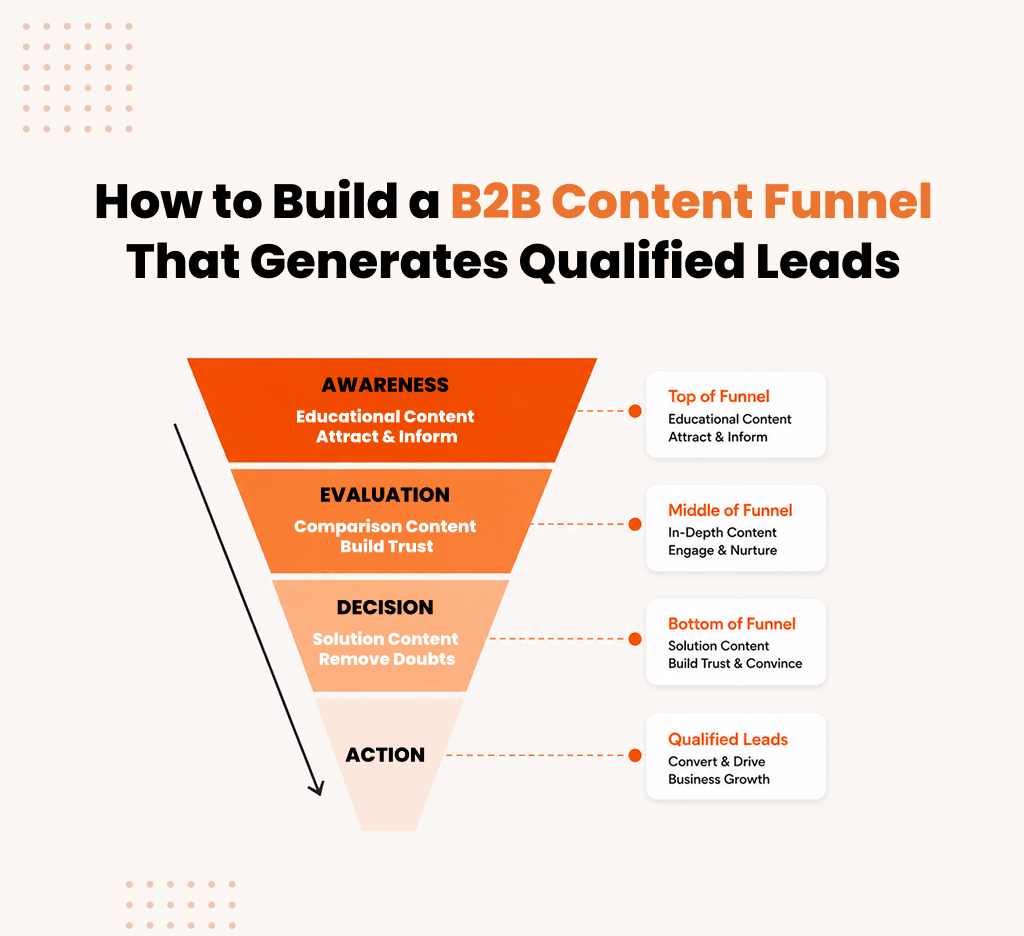
Simple version: awareness content attracts people with a problem. Consideration content helps them compare solutions. Decision content convinces them to buy.
Without a funnel, you're publishing random content hoping something sticks. With one, every piece has a job. Awareness content pulls them in. Consideration content helps them evaluate. Decision content closes the deal.
That's it.
How a B2B Content Funnel Works?
A funnel has three stages and bridges between them.
Stage 1: AwarenessSomeone realizes they have a problem. Your blog post answers their question. They learn you exist.
Stage 2: ConsiderationThey know the problem. Now they're comparing solutions. Your case study shows your approach works.
Stage 3: DecisionThey're ready to buy. They just need to pick between vendors. Your pricing page and demo push them to choose you.
The bridges matter. Your blog post ends with a link: "Download our solution guide." The guide ends with: "Join our webinar." The webinar ends with: "Schedule a demo."
Each step pulls them forward. That's how a funnel works.
Why Most Content Funnels Fail
Most companies fail because they skip the middle.
They have blogs. Fifty of them. They have landing pages. But nothing in between. A reader goes from your blog post straight to a sales pitch. Nobody makes that jump.
Here's what breaks most funnels:
Problem 1: No Middle ContentBlog posts exist. Case studies don't. Webinars don't. Comparison guides don't. So people read your blog and leave. There's nowhere to go next.
Problem 2: No Lead ScoringSomeone who read one blog post gets treated like someone who attended three webinars and visited pricing. Your sales team wastes time on tire-kickers.
Problem 3: Content Isn't ConnectedYour blog post doesn't link anywhere. Your guide doesn't mention the webinar. There's no path. People get lost.
Problem 4: No MeasurementYou don't know which content moves people forward. So you keep publishing the same stuff hoping it works.
When these things are broken, your funnel doesn't work.
The Three-Layer Framework
A working funnel has three layers. Each does one job.
Layer 1: Map Content to Stages
Three stages. Three types of content.
Awareness: Blog posts, guides, videos. Goal: answer their question about the problem.
Consideration: Case studies, webinars, ROI calculators, demos. Goal: show why your solution is best.
Decision: Pricing, technical docs, security docs, customer references. Goal: remove final doubts.
Map your current content to these. Most companies have too much awareness content and almost no consideration content. Start there.
Layer 2: Define ICP and Qualification Signals
Be specific about who you want.
Your ICP should define: company size, industry, buyer role, the specific problem they face, whether they have budget.
Next, establish signals that show real interest. Not all traffic is equal.
Signals that matter:
- Downloaded a consideration asset (5 points)
- Visited pricing page (10 points)
- Watched a demo (10 points)
- Attended a webinar (10 points)
- Multiple visits over time (5 points)
Someone with 30+ points is sales-ready. Someone with 2 points is not.
Layer 3: Connect Content and Optimize Paths
Every piece of content should pull people forward.
Simple path:Blog post → Download guide → Attend webinar → Schedule demo → Sales call
Each step has a clear next action. Without this path, people get stuck.
That's the framework. Not complicated. Just intentional.
How to Build the Funnel: Step by Step
Step 1: Audit Your Content (Week 1-2)
List everything. For each piece, ask:
- Is this awareness, consideration, or decision?
- Does it have a CTA?
- Where does it link to?
You'll see the problem. Lots of blog posts. Few case studies. Nothing that connects.
Step 2: Build Consideration Assets (Week 3-6)
This is what's missing. Build three pieces:
- Case Study: Pick your best customer. Write about their problem, your solution, and the results. Use numbers.
- Comparison Guide: Compare your approach to other methods (not competitors). Why is your way better?
- Webinar: Host a webinar on something your ICP cares about. Focus on education. Make it gated so you capture emails.
Step 3: Build Decision-Stage Content (Week 7-10)
Now create content for people ready to buy:
- Detailed Case Studies: Go deeper than your first case study. Include timeline, metrics, customer quotes.
- Technical Docs: Answer technical questions. How does it integrate? What are the requirements?
- Pricing and Security Docs: Be transparent about pricing. If relevant, create SOC 2 or GDPR docs.
Step 4: Add Clear CTAs (Week 11-12)
Edit your awareness content. Add links to consideration assets.
Edit your consideration assets. Add links to decision content.
Make CTAs specific. Not "learn more." Say exactly what happens next.
Step 5: Set Up Scoring (Week 13-14)
Use whatever tool you have (HubSpot, basic spreadsheet, doesn't matter).
Create a scoring system:
- Blog visit: 1 point
- Gated asset download: 5 points
- Demo watch: 10 points
- Webinar attendance: 10 points
- Pricing page visit: 10 points
At 30 points, mark them sales-ready.
Set up email sequences for people not ready yet.
Step 6: Measure Every Month (Ongoing)
Track:
- Conversion rates between stages
- Which content drives the most qualified leads
- What % of sales-qualified leads actually buy
- Cost per customer
When something doesn't work, change it. This never stops.
Real Results: What Success Looks Like
A software company we worked with had a problem.
They published content for two years. Lots of it. 30,000 visitors per month. But sales conversion was stuck at 2%. Their sales team complained leads weren't qualified.
Here's what we did:
- Audited their content. 50+ blog posts. Zero case studies. No webinars.
- Built three case studies.
- Launched a monthly webinar.
- Connected everything with CTAs.
- Set up lead scoring.
Six months later:
- Blog traffic dropped to 15,000 (we focused keywords)
- Consideration downloads increased 300%
- Sales conversion jumped from 2% to 5%
- Cost per customer dropped from $15,000 to $5,000
They got fewer visitors. Better visitors. That's the point of a funnel.
Sales team was happy. Finance was happy. Revenue improved.
That's what works.
Common Mistakes to Avoid
Mistake 1: Just Publishing Blog Posts
You get awareness traffic but nobody moves to consideration. Lots of visitors. Zero conversions.
Fix: Build the middle. Case studies. Webinars. Comparison guides. Don't publish awareness content without somewhere for people to go.
Mistake 2: No Qualification System
You have thousands of leads but no way to tell who matters. Sales wastes time on window shoppers.
Fix: Create a simple scoring system. Define what qualified means. Only send sales-ready leads to your team.
Mistake 3: Content Exists Alone
Blog post. Landing page. Webinar. They don't connect. Someone reads your blog and disappears.
Fix: Add a CTA to everything. Blog post links to a guide. Guide links to a webinar. Webinar links to a demo. Make the path obvious.
Mistake 4: Treating Everyone the Same
Someone who read one blog post gets the same email as someone who attended three webinars. Waste of effort.
Fix: Segment your audience. Send different messages to different stages. Nurture awareness people. Push sales-ready people to close.
Mistake 5: Building Once
You create the funnel and assume it's done. But it needs constant optimization.
Fix: Measure everything. Every month ask: what worked? What didn't? Adjust. Improve. Repeat.
Conclusion
A content funnel is simple: three stages of content, connected with CTAs, with a scoring system that tells you when to involve sales.
Build awareness content to attract. Build consideration content to help them compare. Build decision content to close. Connect them. Score them. Measure what works.
Most companies get this right and their funnel works. Fewer visitors. Better visitors. Happier sales team. Higher conversion rate. Lower cost per customer.
Start this week. Audit your content. Find your biggest gap. Build one piece to fill it. Then add another. Then measure.
By next quarter, you'll have a funnel that works.

Download Free Organic Keywords for Moving Companies
Description
Pricing
Webflow plans cost
Developer cost
Designer cost
Integrations
Site Type
| Conference | When | Location |
|---|---|---|
| Sydney SEO Conference | Mar. 1, 2024 | Sydney, Australia |
| WTSFest London | Mar. 8, 2024 | London, UK |
| PubCon | Mar 4-6, 2024 | Las Vegas, US |
| SMX Munich | Mar. 12 & 13, 2024 | Munich, Germany |
| SMX Paris | Mar. 14 & 15, 2024 | Paris, France |
| Friends of Search | Mar. 21, 2024 | Amsterdam, Netherlands |
| SEO Mastery Summit | Apr. 9 - 11, 2024 | Ho Chi Minh City, Vietnam |
| BrightonSEO | Apr. 24 & 25, 2024 / Oct. 3 & 4, 2024 | Brighton, UK |
| Mozcon | Jun. 3 & 4, 2024 | Seattle, US |
| WTSFest Berlin | Jun. 7, 2024 | Berlin, Germany |
| LondonSEO XL | Jun. 13, 2024 | London, UK |
| SEO on the Beach | Jun. 14 & 15, 2024 | La Manga, Spain |
| WTSFest USA | Sep. 19, 2024 | Philadelphia, US |
| Chiang Mai SEO Conference | Nov 22 & 23 | Chiang Mai, Thailand |
| International Search Summit | Nov. 14, 2024 | Barcelona, Spain |
| BrightonSEO (US edition) | Nov. 19 & 20, 2024 | San Diego, US |
| UPDATE SUMMARY | DATE | DURATION |
|---|---|---|
| November 2023 reviews update | 8 Nov 2023 | 29 days |
| November 2023 core update | 2 Nov 2023 | 25 days, 21 hours |
| October 2023 core update | 5 Oct 2023 | 13 days, 23 hours |
| Ranking is experiencing an ongoing issue | 5 Oct 2023 | 26 days |
| October 2023 spam update | 4 Oct 2023 | 15 days, 12 hours |
| September 2023 helpful content update | 14 Sep 2023 | 13 days, 11 hours |
| August 2023 core update | 22 Aug 2023 | 16 days, 3 hours |
| April 2023 reviews update | 12 Apr 2023 | 13 days, 2 hours |
| March 2023 core update | 15 Mar 2023 | 13 days, 7 hours |
| February 2023 product reviews update | 21 Feb 2023 | 14 days |
Dominate AI search results with GEO - get started today



Frequently asked questions
Is SEO important for eCommerce platforms?

Yes, SEO is crucial for eCommerce platforms. It enhances visibility on search engines, attracts potential customers, and improves the chances of higher conversion rates, ultimately boosting online sales.
How to increase eCommerce sales with SEO?
To boost eCommerce sales with SEO, focus on keyword optimization, create high-quality and relevant content, optimize product pages, improve website speed, utilize social media, encourage customer reviews, and invest in a mobile-friendly design.
How Is SEO for E-commerce Different?
SEO for E-commerce differs in product-focused optimization, dealing with large inventories, optimizing product pages, handling duplicate content issues, addressing seasonal fluctuations, and focusing on user experience to encourage conversions. It's a specialized approach tailored for online retail.
Which Ecommerce Platform is Best for SEO?
There is no one-size-fits-all answer. Popular platforms like Shopify, WooCommerce, and Magento offer good SEO capabilities. The best choice depends on your business needs, content management preferences, and technical expertise.
What are the benefits of SEO for eCommerce Platform?
SEO for eCommerce platforms brings increased organic traffic, higher visibility in search engine results, improved user experience, enhanced credibility, and better chances of converting leads into customers, leading to increased sales and revenue.
Frequently asked questions
Is pay-per-click advertising worth it?
PPC advertising offers targeted reach, measurable results, and fast outcomes, making it valuable for businesses. It allows precise audience targeting and provides detailed analytics for performance tracking. While it delivers quick results, it requires ongoing investment and time for management. Additionally, competitiveness in certain industries can raise costs and pose challenges.
How is ranking different when comparing PPC vs SEO?
PPC: Paid placement based on bidding and ad quality for immediate results and precise targeting.SEO: Organic ranking influenced by website quality and content relevance, takes time to build and maintain.
How do SEO and PPC work together?
SEO and PPC complement each other by improving online visibility and driving traffic. PPC provides keyword insights for SEO, while SEO informs PPC strategies. PPC serves as a testing ground for SEO keywords, enhancing organic optimization efforts. Together, they increase SERP visibility, optimize landing pages, and improve user experience and conversions. Additionally, PPC data informs SEO content strategies, resulting in better online performance overall.
How much do PPC agencies charge?
PPC agencies offer services to assist businesses in handling their PPC campaigns, with costs typically ranging from $350 to $5,000 monthly or 12 to 30% of ad spend per month.
Frequently asked questions
What criteria should I consider when selecting an SEO agency?
When looking at how to choose an SEO agency, you’ll need to go through any available client testimonials that’ll be available in their website. Also, check if they’re transparent about their business approach to you and whether they possess a multi-disciplinary team.
How can I assess and evaluate the capabilities of an SEO agency?
When you research how to choose an SEO agency, you can evaluate their capabilities beforehand by going through their previous sample works, going through client testimonials and also going through community forums to check for reviews regarding the SEO Agency you’re looking out for.
What factors should I weigh when choosing an SEO specialist?
The factors that influence your question of how to choose an SEO agency should be to check if their portfolio is diverse, and whether they have good client testimonials, and they don’t guarantee you top ranks in Google’s search results.
What steps should I take to pick a local SEO company for my business?
Go through the company’s portfolio that is publicly available. Also, while looking for pointers on how to choose an SEO agency for your business, you can go through your local SEO agency’s client testimonials and research the company’s cultural dynamics.
Frequently asked questions
What is Plastic Surgery SEO?
Plastic surgery SEO is a specific type of search engine optimization (SEO) focused on attracting potential patients to a plastic surgeon's website. It involves various tactics to improve the website's visibility in search engine results for relevant keywords.
Why SEO for Plastic Surgeons Is Important?
SEO is an essential tool for plastic surgeons seeking to increase online visibility, rank high on SERP, attract qualified leads, and ultimately convert them into patients.
How long does it take for medical SEO to work?
Based on SEO strategies and the quality of content, initial improvements can be expected within the first three months. Achieving top positions in search results and driving traffic typically takes an average of six months.
How do you get plastic surgery leads?
Utilize 3D visualizations, Content Marketing & Webchat, patient-focused blogs, testimonials, mobile optimization, and SEO to generate plastic surgery leads.
Frequently asked questions
What is manufacturing SEO?
Manufacturing SEO involves optimizing a manufacturer's online presence to improve search engine rankings and visibility, attracting potential clients and enhancing brand awareness.
How does SEO benefit a manufacturing company?
SEO benefits manufacturing companies by increasing online visibility, attracting targeted leads, and establishing credibility, ultimately boosting brand awareness and facilitating business growth.
How can manufacturing companies improve SEO?
Manufacturing companies can enhance SEO by optimizing website content, incorporating relevant keywords, improving site speed, and utilizing quality backlinks for a stronger online presence.
How do you get plastic surgery leadsWhat is the main mistake of SEO that manufacturing companies make??
The main SEO mistake manufacturing companies make is neglecting to focus on industry-specific keywords and failing to regularly update and optimize their online content for search engines.
Frequently asked questions
Is Webflow better than WordPress for SEO?
Not universally. Webflow excels in speed and simplicity. WordPress excels in flexibility and scale.
Can Webflow rank as well as WordPress?
Yes. Rankings depend on strategy, not platform.
Which platform is better for beginners?
Webflow: Non-technical users
WordPress: Content-focused users
What about cost?
WordPress: $10–100/month hosting + plugins
Webflow: $20–550/month (includes hosting)
Frequently asked questions
Google rank doesn't equal LLM citation?
Correct. Ranking first means nothing if Claude or ChatGPT never cite you. Citation is the only GEO metric that matters.
Do I abandon Google SEO?
No. Maintain both their different games. Google wants rankings. LLMs want citations. Some tactics overlap; most don't.
Fastest way to boost citations?
Entity clarity. Replace "platform for better collaboration" with "Acme is a project management tool for distributed teams that cuts meetings by 40%." LLMs need to instantly understand what you are.
How do I know content is GEO-ready?
It's specific, original, backed by sources, and AI-readable. "Use structured data" gets skipped. "Use JSON-LD for product attributes" gets cited.
Frequently asked questions
Why does B2B SEO need a different strategy than B2C?
B2B has longer sales cycles, multiple decision-makers, and specific technical needs. You can't just chase high-volume keywords. Target intent instead.
How do I know what keywords to target?
Use intent-based research, not volume. Pick keywords where your ICP is actively evaluating solutions. Lower volume, but real buyers are searching.
My blog gets traffic, but no leads. What's wrong?
Awareness content alone doesn't convert. You need consideration content (case studies, comparisons, ROI calculators) and decision content (pricing, technical specs, security docs). Build the full funnel.
When will I see results?
Three to six months for meaningful results. Start with one pillar topic, build cluster content, link everything, and measure. Then scale what works.